
For the admin
Built the way you'd build it
This page is for you, the admin. OutcomeLens was built by an architect who loves this platform and the community around it, so it's made from the parts you already know: Lightning components, Flow actions, and your own objects. Nothing here asks you to work a new way.
It goes where your users already are.
Drop OutcomeLens components onto the record pages your users already open, with Lightning App Builder. Nobody has to learn a new place to go, and you don't have to build one.
Record pages
- Form Launcher
- Related Forms
- Participant Story
- Needs Attention
- Participant Roster
- Program Snapshot Chart
- Submission Receipt
Quick actions on Contact
- Assign Form
- Add to Plan
Quick actions on Form
- Send Invitation
- Cancel Form
Home page
- My Due Forms
Experience Cloud
- Form Renderer
- Form Summary
It works inside the automation you already run.
Actions for Flow and Apex. Assign a form, add someone to a Measurement Plan, or end a membership from any Flow or Apex you already have.
Forms inside your screen Flows. Run any form in a screen Flow, or pick up a form already in progress.
Flow and Apex actions
- Assign Form
- Add to Measurement Plan
- End Measurement Plan Membership
Flow screens
- OutcomeLens Question
- Form Renderer
If you love building Flows, there's a bonus for you.
Questions are built for OutcomeLens forms. You design them in Form Studio, where they get scoring, logic, delivery, and reporting. That's their home, and it doesn't change.
They also work in any screen Flow you build. The OutcomeLens Question component puts any question from your library on a screen in any Flow, for whatever that Flow is for. Search by label, pick the question, and it appears as the right control for its type, with the label, help text, required marker, and validation you already set.
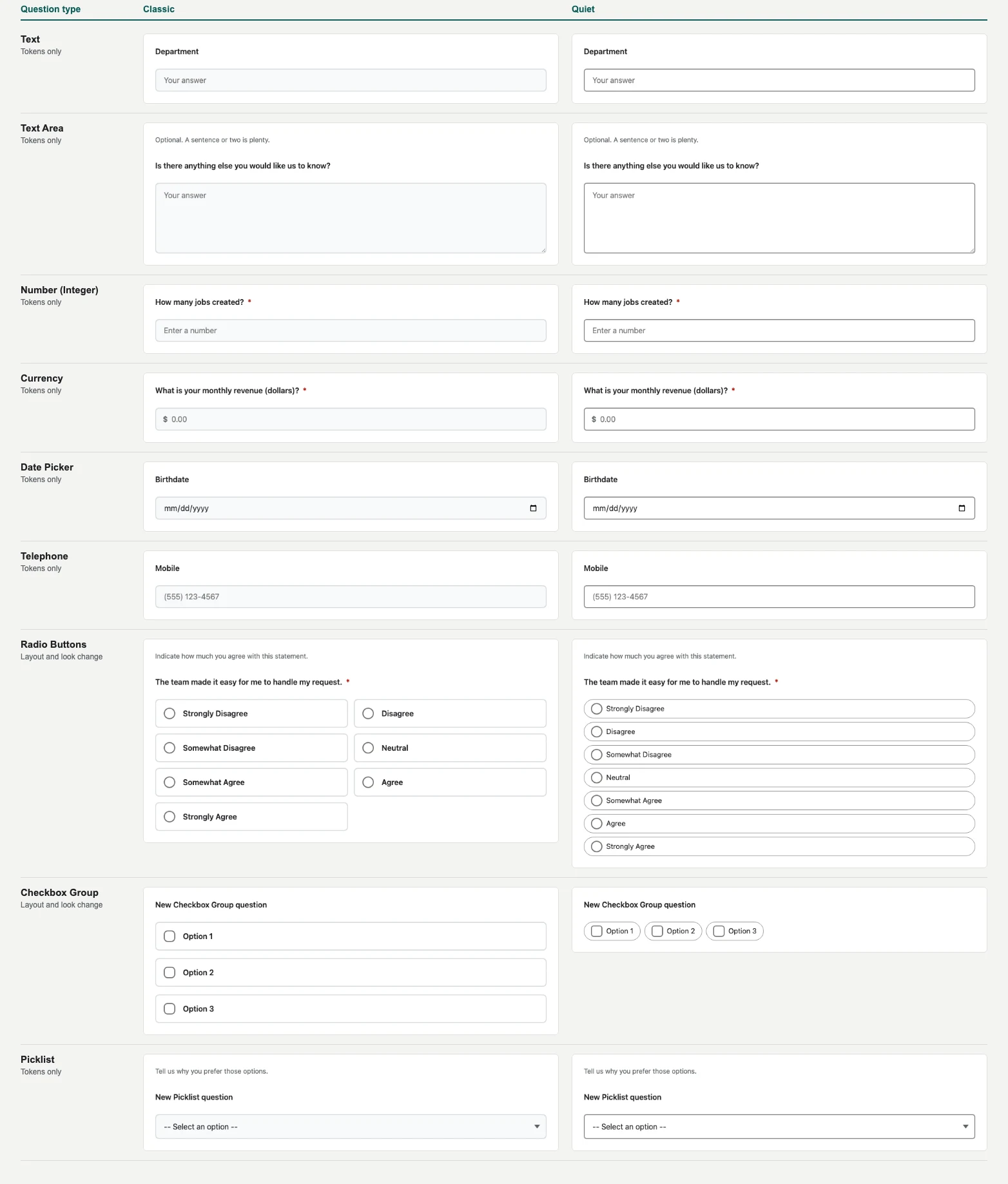
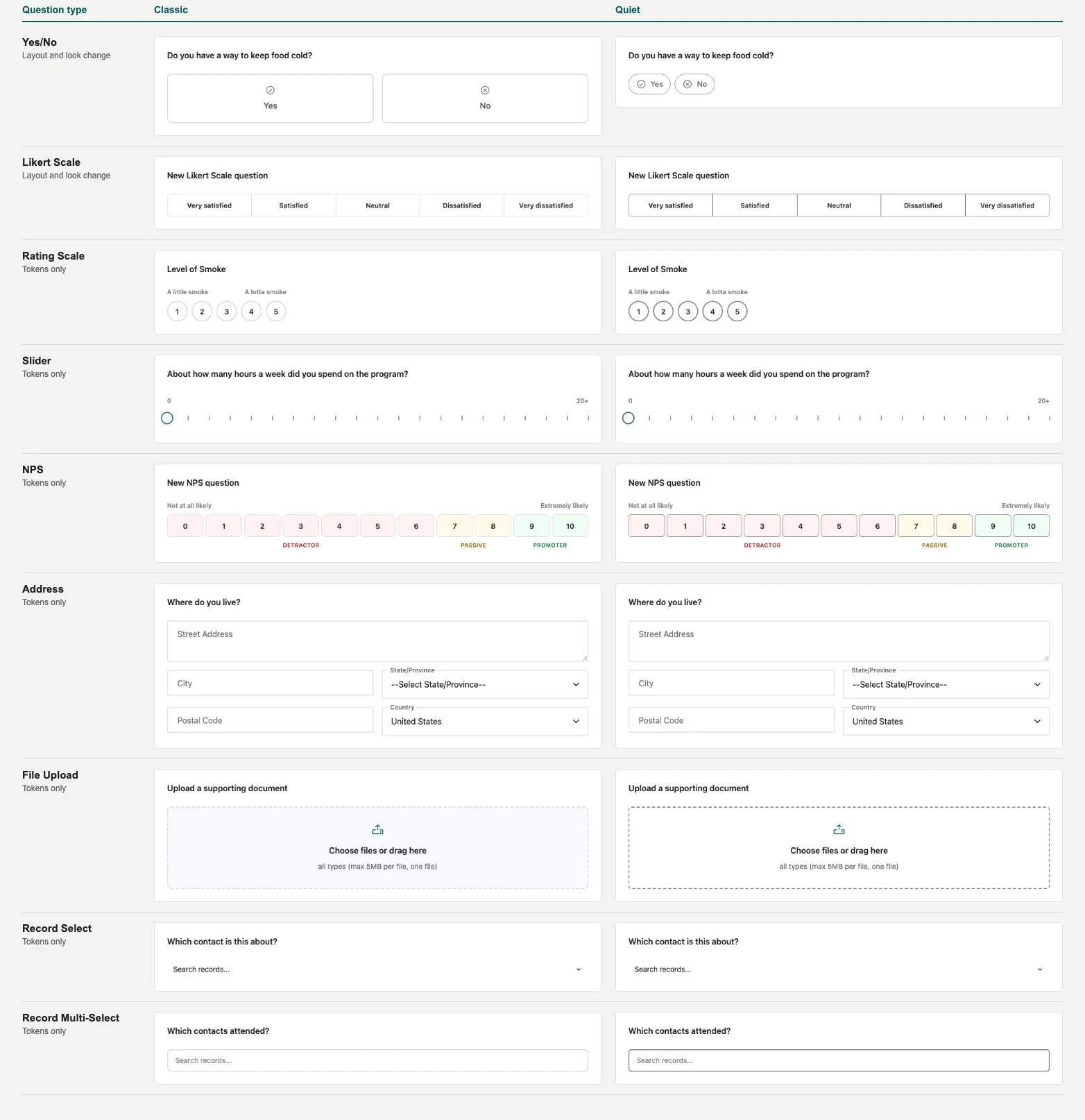
18 input types for your own Flows. Text, number, currency, date, phone, radio buttons, checkboxes, picklists, yes/no, Likert scales, rating scales, sliders, 0 to 10 recommendation scores, addresses, file uploads, and record lookups. Likert scales, rating scales, and 0 to 10 recommendation scores aren't among the standard Flow screen inputs, so a Flow that has nothing to do with OutcomeLens can still use them.
Define it once. Reuse a question in as many Flows as you like. When you change the wording in Form Studio, every screen that uses it picks up the change.
Two looks, your choice. Classic uses bold, full-width tiles. Quiet uses compact pills and thin outlines. Both work on all 18 types. On radio buttons, checkbox groups, yes/no, and Likert scales the layout changes too. On the rest, the colors, borders, and spacing change.
The answer goes where your Flow sends it. Each answer comes back as a Flow variable, so you can put it in your own fields and records. If you want it in OutcomeLens reporting as well, tie it to a form, program, or cohort by typing a value or passing a variable.
A familiar idea. If you've used the UnofficialSF Flow components, this will feel familiar. It's the same spirit: tools you can use anywhere, given back to a community that has given a lot.
See all 18 types, Classic and Quiet
It fits the data model you already have.
Answers land on your objects. Map answers to fields on any object, and create or update several records from one submission.
Your programs, your objects. Program and enrollment records are whatever your org already uses: PMM, Nonprofit Cloud, or a custom object you built. Nothing requires a new object.
Questions that read your records. Record Select and Record Multi-Select questions draw their options from your records.
A plain data model. A completed form is a Form record with one Response record per answer and a Category Score record per category. Scores are calculated when a form is saved, so your dashboards and reports read stored values.
Data
- Field Mapping
- Record Select
- Record Multi-Select
- Repeat groups
- Submission Receipt
You configure it without code.
From install to first form, inside the app. In-app setup walks you through permission sets, settings, and email templates, with no trip to Salesforce Setup.
One canvas for the whole form. Form Studio holds pre-fill, questions, logic, repeat groups, scoring, branding, and field mapping. The Presentation panel styles a form with no CSS.
Templates travel. Export a template from one org and import it into another, so what you build in a sandbox moves with you.
Nothing is guessed. When a write can't finish on its own, such as an answer that matches two contacts, the Review Queue holds it and keeps the answers until you resolve it.
Configuration
- In-app setup
- Form Studio
- Presentation panel
- Template export and import
- Review Queue
- Component Reference
Want to see it in your org? Install a free trial from AgentExchange. Questions first? Talk with us.